안드로이드 스튜디오 event 처리 4 (seekbar)
안드로이드 스튜디오반응형
seekbar 처리
<?xml version="1.0" encoding="utf-8"?>
<LinearLayout xmlns:android="http://schemas.android.com/apk/res/android"
    xmlns:app="http://schemas.android.com/apk/res-auto"
    xmlns:tools="http://schemas.android.com/tools"
    android:layout_width="match_parent"
    android:layout_height="match_parent"
    android:orientation="vertical"
    tools:context=".MainActivity"
    android:layout_margin="10dp">
    <LinearLayout
        android:layout_width="match_parent"
        android:layout_height="wrap_content">
        <TextView
            android:id="@+id/text"
            android:layout_width="wrap_content"
            android:layout_height="wrap_content"
            android:textSize="20dp"
            android:text="R(128)"/>

        <SeekBar
            android:id="@+id/seekBar_r"
            android:layout_width="match_parent"
            android:layout_height="wrap_content"
            android:progress="128"
            android:layout_gravity="center"
            android:max="255" />
    </LinearLayout>

    <LinearLayout
        android:layout_width="match_parent"
        android:layout_height="wrap_content">

        <Button
            android:id="@+id/button"
            android:layout_width="wrap_content"
            android:layout_height="wrap_content"
            android:layout_weight="1"
            android:textSize="20dp"
            android:text="-"
            android:onClick="minus"/>

        <Button
            android:id="@+id/button2"
            android:layout_width="wrap_content"
            android:layout_height="wrap_content"
            android:layout_weight="1"
            android:textSize="20dp"
            android:text="+"
            android:onClick="plus"/>
    </LinearLayout>

    <LinearLayout
        android:layout_width="match_parent"
        android:layout_height="wrap_content">
        <TextView
            android:id="@+id/text2"
            android:layout_width="wrap_content"
            android:layout_height="wrap_content"
            android:textSize="20dp"
            android:text="G(128)"/>

        <SeekBar
            android:id="@+id/seekBar_g"
            android:layout_width="match_parent"
            android:layout_height="wrap_content"
            android:progress="128"
            android:layout_gravity="center"
            android:max="255"/>
    </LinearLayout>
    <LinearLayout
        android:layout_width="match_parent"
        android:layout_height="wrap_content">

        <Button
            android:id="@+id/button3"
            android:layout_width="wrap_content"
            android:layout_height="wrap_content"
            android:layout_weight="1"
            android:textSize="20dp"
            android:text="-"
            android:onClick="minus"/>

        <Button
            android:id="@+id/button4"
            android:layout_width="wrap_content"
            android:layout_height="wrap_content"
            android:layout_weight="1"
            android:textSize="20dp"
            android:text="+"
            android:onClick="plus"/>
    </LinearLayout>

    <LinearLayout
        android:layout_width="match_parent"
        android:layout_height="wrap_content">
        <TextView
            android:id="@+id/text3"
            android:layout_width="wrap_content"
            android:layout_height="wrap_content"
            android:textSize="20dp"
            android:text="B(128)"/>

        <SeekBar
            android:id="@+id/seekBar_b"
            android:layout_width="match_parent"
            android:layout_height="wrap_content"
            android:progress="128"
            android:layout_gravity="center"
            android:max="255"/>
    </LinearLayout>

    <LinearLayout
        android:layout_width="match_parent"
        android:layout_height="wrap_content">

        <Button
            android:id="@+id/button5"
            android:layout_width="wrap_content"
            android:layout_height="wrap_content"
            android:layout_weight="1"
            android:textSize="20dp"
            android:text="-"
            android:onClick="minus"/>

        <Button
            android:id="@+id/button6"
            android:layout_width="wrap_content"
            android:layout_height="wrap_content"
            android:layout_weight="1"
            android:textSize="20dp"
            android:text="+"
            android:onClick="plus"/>
    </LinearLayout>

    <LinearLayout
        android:layout_width="match_parent"
        android:layout_height="wrap_content">

        <EditText
            android:id="@+id/edit"
            android:layout_width="match_parent"
            android:layout_height="wrap_content"
            android:layout_weight="6"
            android:hint="입력하세요"
            />

        <Button
            android:id="@+id/submit"
            android:layout_width="wrap_content"
            android:layout_height="wrap_content"
            android:layout_weight="1"
            android:text="확인" />
    </LinearLayout>


    <TextView
        android:id="@+id/textView"
        android:layout_width="match_parent"
        android:layout_height="match_parent"
        android:textSize="50dp"
        android:gravity="center_horizontal|center_vertical"
        android:text="TextView" />

</LinearLayout>
package com.example.seekbar;
import androidx.appcompat.app.AppCompatActivity;
import android.graphics.Color;
import android.os.Bundle;
import android.view.View;
import android.widget.Button;
import android.widget.EditText;
import android.widget.SeekBar;
import android.widget.TextView;
public class MainActivity extends AppCompatActivity {
SeekBar seek_r,seek_g,seek_b;
TextView textView;
TextView text_r,text_g,text_b;
EditText editText;
Button submit;
int red,green,blue;
@Override
protected void onCreate(Bundle savedInstanceState) {
super.onCreate(savedInstanceState);
setContentView(R.layout.activity_main);
textView = findViewById(R.id.textView);
text_r = findViewById(R.id.text);
text_g = findViewById(R.id.text2);
text_b = findViewById(R.id.text3);
seek_r = findViewById(R.id.seekBar_r);
seek_g = findViewById(R.id.seekBar_g);
seek_b = findViewById(R.id.seekBar_b);
editText = findViewById(R.id.edit);
submit = findViewById( R.id.submit);
submit.setOnClickListener(new View.OnClickListener() {
@Override
public void onClick(View v) {
textView.setText(editText.getText());
}
});
seek_r.setOnSeekBarChangeListener(new SeekBar.OnSeekBarChangeListener() {
@Override
public void onProgressChanged(SeekBar seekBar, int progress, boolean fromUser) {
text_r.setText(String.format("R(%03d)",progress));
red = progress;
textView.setTextColor(Color.rgb(red,green,blue));
} // 드래그 하는 중
@Override
public void onStartTrackingTouch(SeekBar seekBar) {
} //누르기 시작함함
@Override
public void onStopTrackingTouch(SeekBar seekBar) {
}// 드래그 멈춤
});
seek_g.setOnSeekBarChangeListener(new SeekBar.OnSeekBarChangeListener() {
@Override
public void onProgressChanged(SeekBar seekBar, int progress, boolean fromUser) {
text_g.setText(String.format("G(%03d)",progress));
green =progress;
textView.setTextColor(Color.rgb(red,green,blue));
}
@Override
public void onStartTrackingTouch(SeekBar seekBar) {
}
@Override
public void onStopTrackingTouch(SeekBar seekBar) {
}
});
seek_b.setOnSeekBarChangeListener(new SeekBar.OnSeekBarChangeListener() {
@Override
public void onProgressChanged(SeekBar seekBar, int progress, boolean fromUser) {
text_b.setText(String.format("B(%03d)",progress));
blue = progress;
textView.setTextColor(Color.rgb(red,green,blue));
}
@Override
public void onStartTrackingTouch(SeekBar seekBar) {
}
@Override
public void onStopTrackingTouch(SeekBar seekBar) {
}
});
}
public void minus(View view) {
switch (view.getId())
{
case R.id.button:
if (seek_r.getProgress()>10)
seek_r.setProgress(seek_r.getProgress()-10);
else
seek_r.setProgress(0);
break;
case R.id.button3:
if (seek_g.getProgress()>10)
seek_g.setProgress(seek_g.getProgress()-10);
else
seek_g.setProgress(0);
break;
case R.id.button5:
if (seek_b.getProgress()>10)
seek_b.setProgress(seek_b.getProgress()-10);
else
seek_b.setProgress(0);
break;
}
}
public void plus(View view) {
switch (view.getId())
{
case R.id.button2:
if (seek_r.getProgress()>245)
seek_r.setProgress(255);
else
seek_r.setProgress(seek_r.getProgress()+10);
break;
case R.id.button4:
if (seek_g.getProgress()>245)
seek_g.setProgress(255);
else
seek_g.setProgress(seek_g.getProgress()+10);
break;
case R.id.button6:
if (seek_b.getProgress()>245)
seek_b.setProgress(255);
else
seek_b.setProgress(seek_b.getProgress()+10);
break;
}
}
}
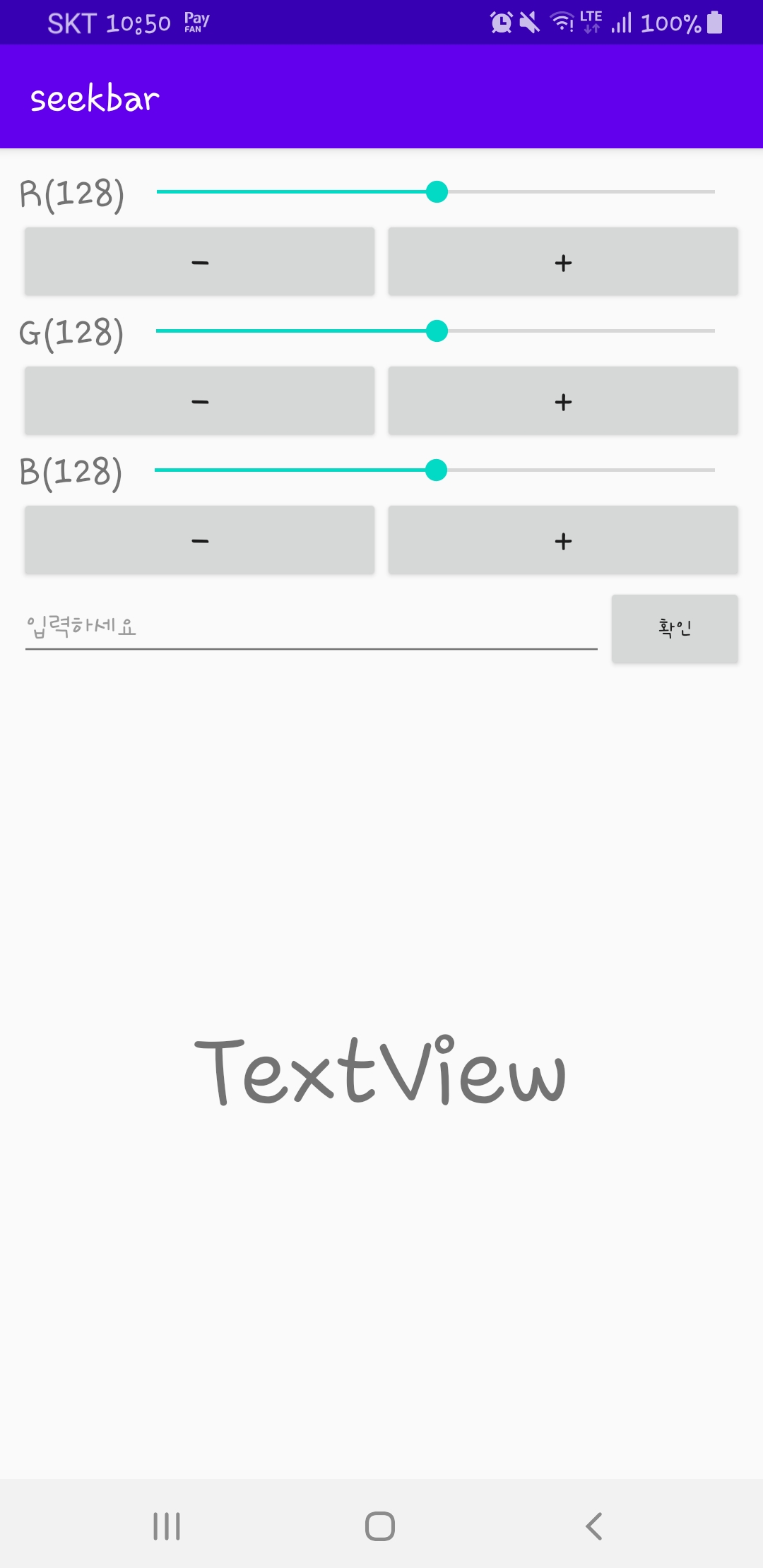


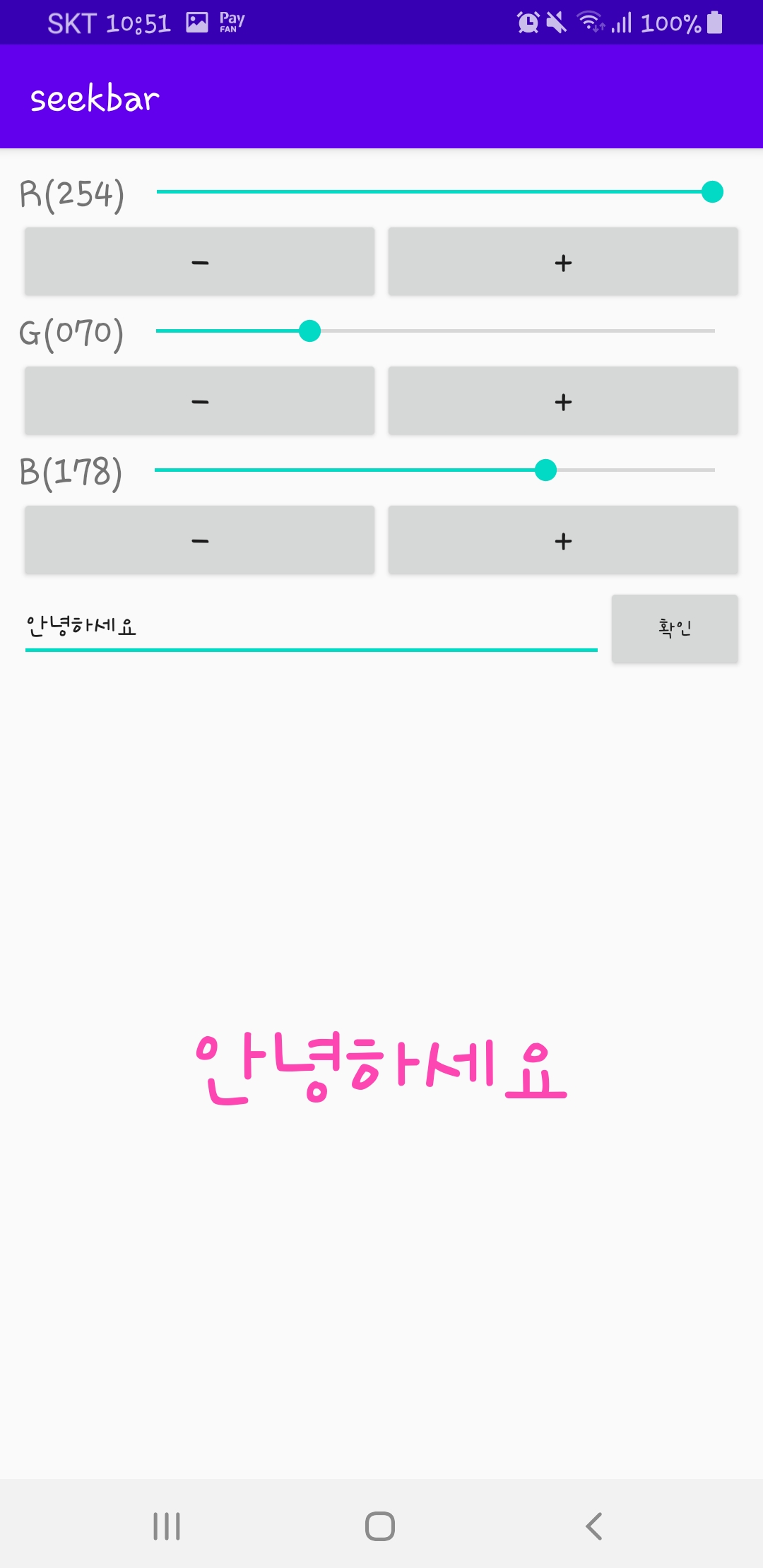
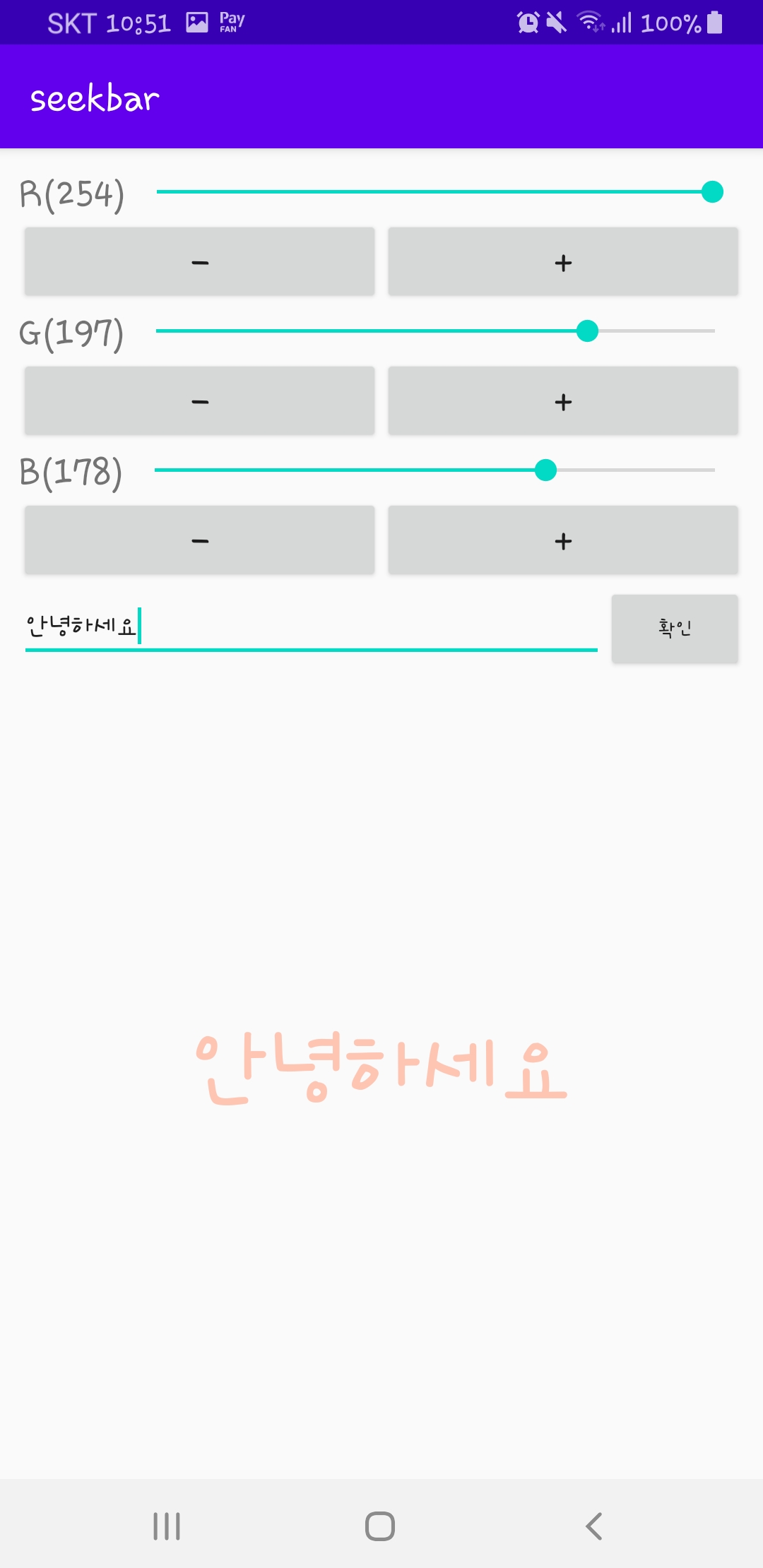
반응형
'안드로이드 스튜디오' 카테고리의 다른 글
| 안드로이드 스튜디오 대화상자 (0) | 2020.04.25 |
|---|---|
| 안드로이드 스튜디오 메뉴 설정 (0) | 2020.04.25 |
| 안드로이드 스튜디오 터치 이벤트 (0) | 2020.04.19 |
| 안드로이드 스튜디오 event 처리 3 (0) | 2020.04.18 |
| 안드로이드 스튜디오 event 처리2 (0) | 2020.04.18 |